Fire3D includes an emergency lighting designer that uses AI to auto-fill plans and calculates lux levels. It uses the same AI detection of rooms, doors, room types and escape routes as the automated fire alarm design. It is designed for UK emergency lighting work to BS 5266-1.
The emergency lighting designer is included in both paid plans, Growing and Unlimited, and in the 30-day free trial. The trial does not need a credit card. Plan prices and limits are on the Fire3D pricing page.
This page describes what the designer does today. It does not list specific lux values from BS 5266-1, BS EN 1838 or BS EN 50172, and it does not claim that a particular output is a certificate of compliance.
How the emergency lighting designer works
The designer starts from a floor plan in Fire3D and uses the same AI as the fire alarm design to detect rooms, doors, room types and escape routes. You can then import fire alarm devices and add other devices specified as needing specific lux levels. The software asks which lights you want to use, then auto-fills the floor plan with the required lux coverage based on the luminaires you have chosen.
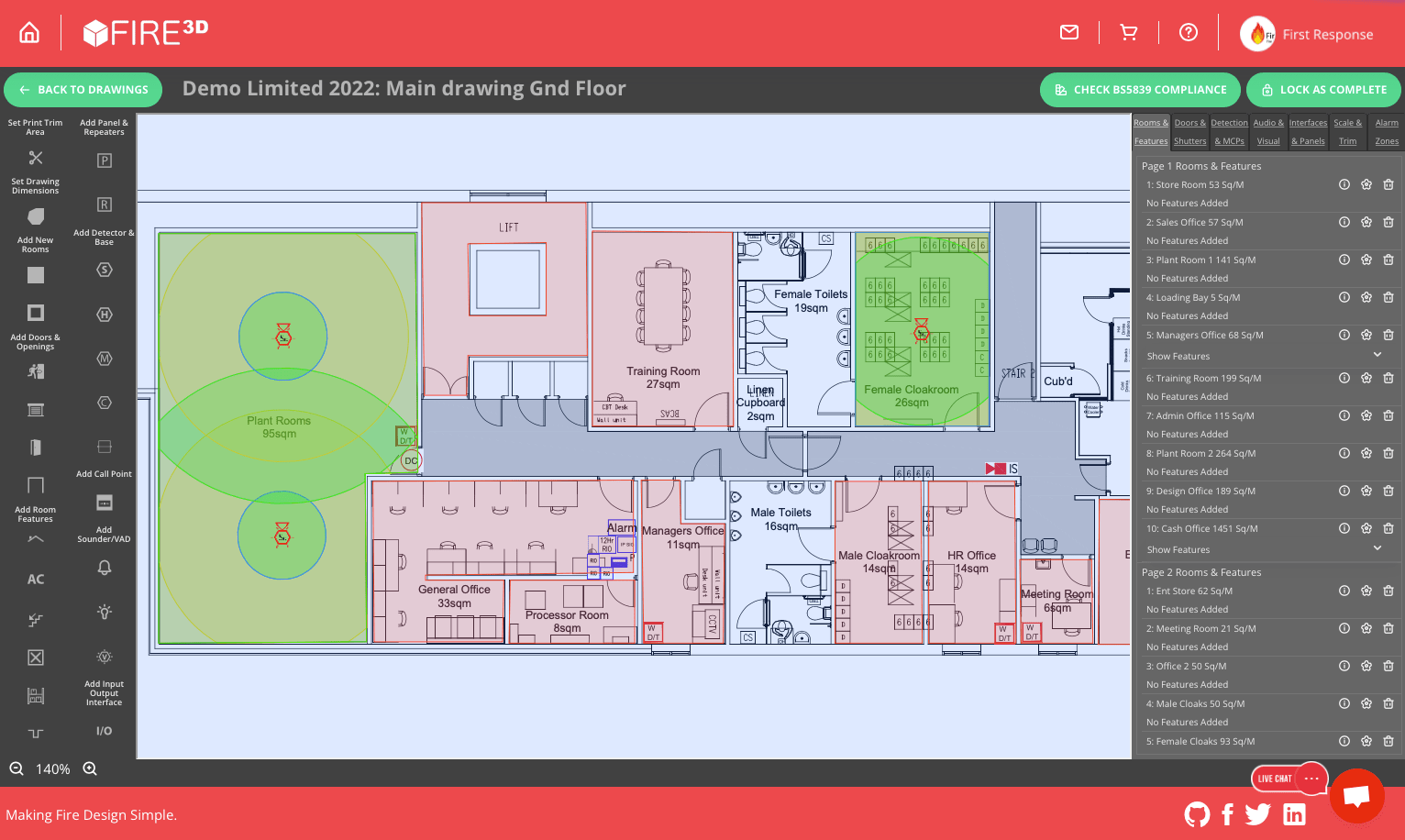
1. The same AI room and route detection
The emergency lighting designer uses the same AI detection of rooms, doors, room types and escape routes as the automated fire alarm design, on the floor plan you are working from.
2. Import fire alarm devices, and add others
You can import fire alarm devices and add other devices specified as needing specific lux levels. This page does not list those lux values from the standards.
3. Choose the lights you want to use
The software then asks which lights you want to use. The auto-fill that follows is based on the luminaires you choose.
4. Auto-fill the required lux coverage
Fire3D auto-fills the floor plan with the required lux coverage based on those chosen luminaires, and calculates lux levels on the layout. This page does not quote the minimum values from the standards.
Vector-based PDF output
All Fire3D output is vector-based PDF, so detail is preserved at any zoom level, like AutoCAD output. The floor plan can be placed into a new engineering drawing with your logo, after the legend and white space of the original PDF have been cropped away.
Designed for UK emergency lighting work
The designer is intended for UK emergency lighting work to BS 5266-1. The current code of practice is read with BS EN 1838 and BS EN 50172.
Those documents set out how emergency lighting of premises should be designed, installed and maintained, including escape lighting and related provisions. This page does not reproduce their tables or recommended illuminance values. When you review an auto-filled plan, check the current editions of the standards, the fire risk assessment and the project specification.
An auto-filled plan, and a lux calculation in the software, are design aids. They are not a substitute for a competent designer, and Fire3D does not issue an emergency lighting certificate of compliance.
Alongside fire alarm design in the same software
The emergency lighting designer uses the same AI detection of rooms, doors, room types and escape routes as Fire3D’s automated fire alarm design. You can also import fire alarm devices into the emergency lighting design. Fire3D is UK fire alarm design software for BS 5839-1 workflows as well: automated fire alarm design from a floor plan PDF, coverage checks, specifications and as-fitted drawings, and zone plans.
If you already use Fire3D for fire alarm work, you do not need a separate subscription to use the emergency lighting designer. Both sit on the Growing and Unlimited plans. If you are new to the software, start with the 30-day free trial from the Fire3D homepage or the button below.
Which plans include the emergency lighting designer
The AI emergency lighting designer is included in both Growing and Unlimited, and can be used during the 30-day free trial. On the pricing table (confirmed 11 November 2026, Europe/London):
- Growing is £49.99 per month, or £499.90 a year when billed annually, with 5 floorplan uploads per month, £5 AI credits per month and 1 user account.
- Unlimited is £99.99 per month, or £999.90 a year when billed annually, with unlimited floorplan uploads, £10 AI credits per month, and 1 user plus 2 colleague accounts.
See the full comparison on the Fire3D pricing page.
Frequently asked questions
What does the emergency lighting designer do?
It uses the same AI detection of rooms, doors, room types and escape routes as the fire alarm design. You can import fire alarm devices and add other devices specified as needing specific lux levels. The software asks which lights you want to use, then auto-fills the floor plan with the required lux coverage based on those luminaires, and calculates lux levels. It is designed for UK emergency lighting work to BS 5266-1.
Does it use the same AI as the fire alarm design?
Yes. The emergency lighting designer uses the same AI detection of rooms, doors, room types and escape routes.
Can I import fire alarm devices?
Yes. You can import fire alarm devices and add other devices specified as needing specific lux levels, then choose the lights you want to use.
Does Fire3D calculate lux?
Yes. The designer calculates lux levels and auto-fills the floor plan with the required lux coverage based on the luminaires you have chosen. This page does not quote specific values from BS 5266-1, BS EN 1838 or BS EN 50172.
Is the output a vector PDF?
Yes. All Fire3D output is vector-based PDF, so detail is preserved at any zoom level, like AutoCAD output. The floor plan can be placed into a new engineering drawing with your logo.
Is this a BS 5266-1 compliance certificate?
No. The designer is a tool for laying out and reviewing a plan. Responsibility for the design, and for any declaration against BS 5266-1, BS EN 1838 or BS EN 50172, remains with the competent person doing the work.
Is the emergency lighting designer included in both plans?
Yes. It is included in Growing (£49.99 per month, or £499.90 a year billed annually) and Unlimited (£99.99 per month, or £999.90 a year billed annually), and in the 30-day free trial. Full limits are on the pricing page.
Can I try it before I subscribe?
Yes. A 30-day free trial with access to all core features is available, and sign-up does not require a credit card.
Related pages
Try the emergency lighting designer on a plan of your own
Start a 30-day free trial, with no credit card, and use the AI emergency lighting designer, including lux coverage from the luminaires you choose, on your own floor plan.